Live visuals that glow.
Phosphor finds the beat by itself and lines your visuals up to it. It hears the tempo in the music (a mic, an input, or the tracks it plays), reads each clip's own visual rhythm and locks the two together, and can run the show on autopilot. Free software for VJs, live shows and installations: stack layers, fire clips on the beat, chain effects and shaders, map every control to MIDI, OSC or your keyboard, build your own control surface, and warp your output onto anything with projection mapping as easy as dragging corners.
Free. In the browser you sign in with a free account, which also keeps your projects and layouts.
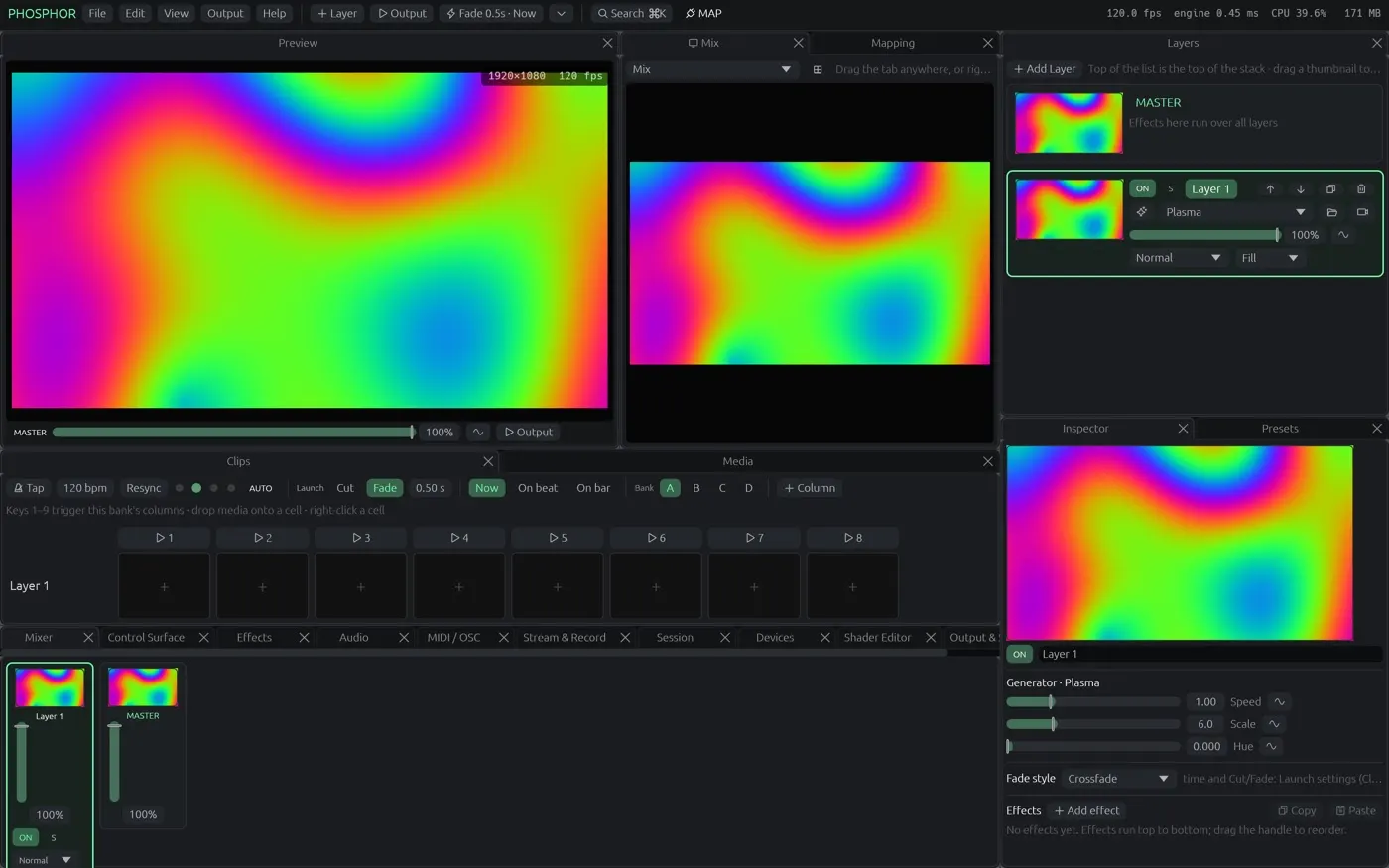
It finds the beat. It lines the visuals up. By itself.
No tapping, no trimming clips by hand, no cable to the DJ booth. Drop in footage and a track and the show is on the beat.
Automatic beat detection
Phosphor listens to the music and finds the tempo, the beat and the downbeat on its own: from a microphone, an audio input, the phones of people watching your session, or the tracks Phosphor itself is playing. Tap tempo, MIDI clock and Ableton Link are there when you want them.
Clips that lock themselves to the beat
Match the beat reads a movie's own visual rhythm (cuts, flashes, movement), works out its tempo and sets the loop and speed so every hit lands on a beat. One click per clip, or Auto-match: every movie you drop into the grid is scanned and locked as it arrives.
Auto show, Surprise, React
Auto show fires the next column every few bars and a Surprise when the music drops; Autopilot walks each layer through its clips. Surprise builds a new look on every layer. React makes effects and generators follow the levels and the beat. Audience play hands timed turns to the crowd's phones. Set it going and watch the room.
One app for the whole show
Match the beat
One click finds the visual rhythm of a clip (cuts, flashes, movement) and locks it to the music's tempo, so the picture hits on the beat: one hit a beat, every two beats, or two a beat.
Layers and a clip grid
Stack layers with blend modes and opacity, fire clips and whole columns, crossfade or cut, and quantise launches to the beat or the bar. Tap tempo or let Phosphor follow the music.
Effects and shaders
Dozens of built-in effects and generators, a native Rutt-Etra scan processor, master effects over the whole mix, any effect as a clip transition, and ISF shader import (MadMapper materials too). Write your own shaders with live preview.
Map anything
Right-click any slider or button and press Listen: move a MIDI knob, send OSC or press a key and it's mapped. Every control also answers a built-in OSC address with no setup.
Your own control surface
Place buttons, toggles, faders and XY pads, and make each one drive many controls at once with its own ranges. Use it from your phone or iPad over Wi-Fi.
Projection mapping
Drag corners straight on the projector, warp with a mesh, run the picture along a line, cut masks, soft-edge blend between projectors, colour-correct each output and send each one to its own screen.
Everything moves
LFOs, audio levels and bands, beat, random and step sequencers can drive any value, synced to the tempo.
Movies, music, cameras, streams
Hardware-decoded video with reverse, ping-pong and beat loops; sound files as clips, with the visuals reacting to the music you play; live cameras, network streams, Syphon and NDI (Mac app).
Stream and record
Stream to YouTube and Twitch at the same time (RTMPS) while recording a copy, record ProRes, HEVC or Hap straight from Phosphor, or send to OBS and other apps over Syphon and NDI (Mac app).
Let the audience play
Put a QR code on the output; phones that scan it take turns at your clips and controls for a set time, with the player's name on screen. No app to install.
Light on your computer
A single modern GPU engine (Metal, WebGPU) that renders a full show in well under a millisecond, so your fans stay quiet.
Coming from VDMX, Resolume or MadMapper?
Phosphor takes what each of them is loved for and puts it in one free app. See the full feature-by-feature comparison.
The clip grid, the way you know it
Layers × columns with banks, column triggers, beat and bar quantised launch, transitions and blend modes, autopilot, trigger modes, per-clip settings and effects, layer groups and a crossfader. Imports your Resolume compositions.
Modular control, everything mappable
Dockable panels and layouts, control surfaces you build, LFO / audio / step-sequencer modulation on any value, MIDI and OSC learn with feedback, OSC Query, ISF shaders, Syphon and NDI. Imports VDMX project media.
Mapping made easy
Drag corners on the projector, mesh warp, line slices, 3D models (OBJ), masks with soft edges, edge blending, per-output colour, many outputs and slices, venue presets, Art-Net / sACN LED mapping and moving heads.
Where it runs
In your browser
Chrome or Edge on a recent Mac or PC (WebGPU). Layers, effects, shaders, generators, mapping and control surfaces.
Open PhosphormacOS app
Apple silicon. Adds video files, cameras, audio input, MIDI, Syphon, NDI, streaming, LED mapping and multiple projector outputs. Open source, updates itself.
Download for MacFirst launch: System Settings ▸ Privacy & Security ▸ Open Anyway (not notarized yet).
Windows (preview)
The same app for Windows 10 and 11: unzip and run Phosphor.exe. New and not yet tested on many PCs; no Syphon (Spout is planned). Windows warns once: More info, Run anyway.
Download for WindowsiPad and iPhone
Use your phone as a remote today (Session panel, scan the QR code). A full iPad app is planned.
PlannedPricing
Phosphor is free to use. A free account keeps a few projects and all your layouts; pay only for more space.
$0
The whole app, with a free account.
- Every layer, effect, shader and generator
- Controller mapping and control surfaces
- Projection mapping and outputs
- 5 projects (50 MB) in your account
- Your layouts on every computer
- Unlimited projects saved to your own computer
$7/month or $59/year
Your shows, anywhere you sign in.
- Everything in Free
- 1 GB in your account: hundreds of projects
- Open your shows on any computer
$149 one time
Back Phosphor early. Limited to the first 100.
- Everything in Pro, for good
- No subscription
- Your feature requests read first
Pro opens soon; until then everything is free. Create a free account and you're ready.
Questions
Is Phosphor really free?
Yes. The whole app is free. A free account keeps 5 projects and your layouts; Pro is only for more space.
Do I need an account?
In the browser, yes (free). The Mac app works without one; sign in if you want your projects and layouts kept in your account. We never sell anything about you (see Privacy).
Which browsers?
Chrome or Edge with WebGPU, on a Mac or PC from the last few years. Safari support follows as WebGPU ships there.
Is Phosphor an alternative to Resolume, VDMX or MadMapper?
For most shows, yes: Resolume's clip grid and launch quantise, VDMX's modular control and ISF shaders, MadMapper's corner-drag mapping and LED mapping, in one free app. It imports Resolume compositions and VDMX projects. Feature by feature, or by app: Resolume, VDMX, MadMapper.
Can it sync video to the music?
Yes. Beat loops and launch quantise follow the tempo (tap, audio, MIDI clock or Ableton Link), and Match the beat reads a clip's own rhythm and locks it to that tempo, so the cuts land on the beat.
Does it work with my MIDI controller or TouchOSC?
Yes in the Mac app: any MIDI controller, OSC from TouchOSC or other apps (Phosphor shows up on the network), or your keyboard.